Hi Everyone!
During this wonderful holiday weekend I took some time to make some videos. They are based off of articles I have already written but I thought some of you might be interested in them.
The first one goes through the steps for setting up Google Analytics:
This is something I would hope most of my readers have already done but it may be helpful for those new Etsy users out there.
The second one goes through the steps of finding out when Google last crawled your Etsy shop:
This one is based off the previous article here
The third one gives the steps of setting up advanced segments for google analytics:
Which is based off of the previous article here
I would greatly appreciate any feedback you have on these videos. Feel free to leave comments here or on the videos themselves.
Love Always,
Susan
Showing posts with label Video Tutorials. Show all posts
Showing posts with label Video Tutorials. Show all posts
Saturday, July 4, 2009

Wednesday, July 1, 2009
When did Google Last Crawl my Shop?
By crawl I mean when Google last visited your site to gather data. It is helpful to know this during seo changes because sometimes it can take a few weeks after your changes for Google to check out your site again.
Instructions:
More of a visual learner? Check out this video!
Don't understand something I wrote about? Have a related question? Post a comment and I will be sure to answer it. Have an unrelated question? Submit it here and I will feature it on my blog!
xoxo
susan.
Instructions:
- Open up Google
- Enter in your shops address in the search bar

- Click "Google Search", your shop should return as one of the top results
- Click the "Cached" text right below your description

- At the very top of the page it should give you the last date that Google gathered data from your shop.


More of a visual learner? Check out this video!
Don't understand something I wrote about? Have a related question? Post a comment and I will be sure to answer it. Have an unrelated question? Submit it here and I will feature it on my blog!
xoxo
susan.
Tuesday, June 2, 2009
Advanced Segments in Google Analytics
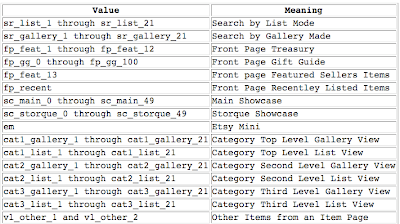
Within Google Analytics you may have noticed the "Advanced Segments" section on the left side of your menu. This feature allows you to track how people find you on etsy with a great deal of precision. Below you will find a detailed set of instructions:
To see the results follow the steps below:

More of a visual learner? Check out this video!
Don't understand something I wrote about? Have a related question? Post a comment and I will be sure to answer it. Have an unrelated question? Submit it here and I will feature it on my blog!
xoxo
susan.
- Log into Google Analytics
- Click "Advanced Segments" on the left side
- Click "Create new custom report"
- Under "Dimensions" click "Content"
- Drag the "Page" box to the Dimension slot (see image below)
- In the drop down menu select "Contains"
- In the Value box put "ref=sr" (More options for this text will be provided below)
- Click "Test Segment" which should cause some results to pop up
- In the "Name segment:" box put "search"
- Click "Create Segment"
- Follow steps 4-10 again but this time enter the text "ref=fp" in your value box and name it "front page"
- Follow steps 4-10 again but this time enter the text "ref=pounce" in your value box and name it "pounce"

To see the results follow the steps below:
- Click "Analytics Settings" at the top left
- Click "View Report"
- Click "Content"
- In the upper right corner click the "All Visits" menu
- Check off your new segments (see picture below)
- Click "Apply"


More of a visual learner? Check out this video!
Don't understand something I wrote about? Have a related question? Post a comment and I will be sure to answer it. Have an unrelated question? Submit it here and I will feature it on my blog!
xoxo
susan.
Tuesday, May 26, 2009
How Etsy Shoppers Find Your Shop
You more than likely have seen some really bizarre keywords on your Google Analytics account. If you are wondering why, I have an article here: How to make your Etsy Google Friendly
Since our shops are under a main website (etsy.com), it is hard to figure out what keywords people used to find your specific shop on Etsy. The good news is that you can track how shoppers within Etsy find your shop using keywords.
To set this up, follow these steps (if the pictures are too small for you just click on them for bigger versions):
Don't understand something I wrote about? Have a related question? Post a comment and I will be sure to answer it. Have an unrelated question? Submit it here and I will feature it on my blog!
xoxo
susan.
Since our shops are under a main website (etsy.com), it is hard to figure out what keywords people used to find your specific shop on Etsy. The good news is that you can track how shoppers within Etsy find your shop using keywords.
To set this up, follow these steps (if the pictures are too small for you just click on them for bigger versions):
- Log-in to Google Analytics

- Click "edit" see the heart in the picture
- In the top right of the "Main Website Profile Information" box click "edit"
- Under "Site Search" change the settings to match the picture below
- Click "Save Changes"


- Log in to Google Analytics
- Click "View report"
- Click "Content"
- Click "Site Search"
Don't understand something I wrote about? Have a related question? Post a comment and I will be sure to answer it. Have an unrelated question? Submit it here and I will feature it on my blog!
xoxo
susan.
Subscribe to:
Posts (Atom)

